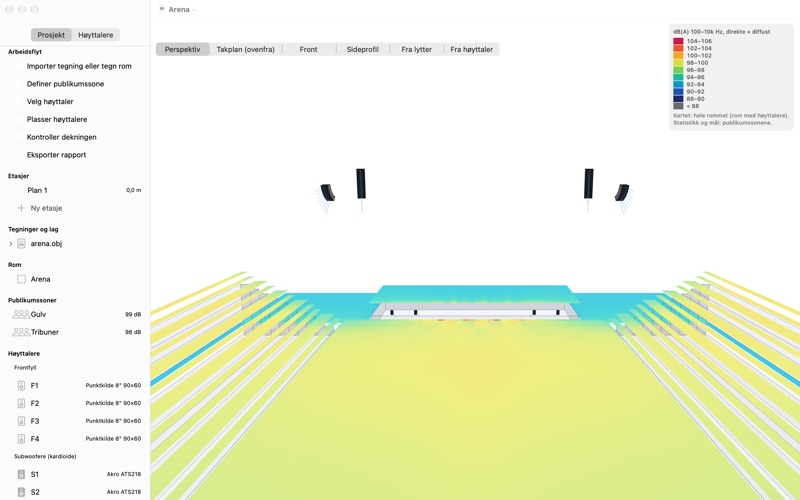
The base license covers drawings, loudspeakers, SPL map and report. The label next to each feature shows the module it belongs to. Complete includes everything.
The labels show which module a feature belongs to:Base licenseCAD and BIMInstallationLine arrayRoom acousticsMeasured data
Drawings and import
DXF (ASCII R12–2018) with layers, blocks, units and scaleBase license
PDF plan as an underlay, with scale and calibrationBase license
Rooms are detected from closed polylines and line networks, with names from the text in the drawing. You enter the ceiling heightBase license
Survey points from laser distance meters (for example Leica DISTO exports) are shown as clear numbered targets, and loudspeakers snap to the centre of the pointBase license
DWG drawings (R14, 2000, 2004, 2010, 2013 and 2018). DWG 2007 is not supported; save as 2010 or later, or as DXFCAD and BIM
IFC2x3 and IFC4 from BIM: storeys with elevation, rooms with name, area and ceiling height, walls, slabs and furniture in 3DCAD and BIM
3D models in OBJ and STL, and audience zones that follow the floor of the model, for example tiered seatingCAD and BIM
Placement and views
Audience zones with target level and toleranceBase license
Place loudspeakers with a click or drag and drop, and aim them with the mouse. Snapping, undo and redoBase license
2D plan and 3D view with perspective, top, front and side viewsBase license
Measurement points and dimension linesBase license
Vertical sections: the sound field in a section through the room is shown below the plan, in 3D and in the report, with the engine’s values at every pointBase license
Sound waves in the whole room in 3D: a wave simulation with reflections from floor, ceiling, walls and objects, also under tables and between rows of pews, shown in 3D, on the plan at any height and in sections. Plus the direct sound from the calculation and a fast 2D simulation. The waves are recalculated when something movesBase license
Loudspeakers are drawn in 3D by type and dimensions, and the manufacturer’s 3D file (OBJ, STL or DXF) can be linked to a modelBase license
3D view from a listener position or along the axis of a loudspeakerBase license
Calculation
Direct sound in free field in 31 third-octave bands from 20 Hz to 20 kHzBase license
Air absorption according to ISO 9613-1 (temperature, humidity and pressure)Base license
Frequency-dependent directivity, frequency response, EQ, delay and polarityBase license
Directivity is evaluated at every frequency sample in the third-octave band, not only at the centre frequencyBase license
Coherent summation with phase, for example for cardioid subwoofersBase license
Broadband (A-, C- and Z-weighted), octave and third-octave bandsBase license
Coverage statistics: mean, min, max, P10–P90 and share within targetBase license
Frequency response and arrival times at measurement pointsBase license
Level and spread (P10–P90) per octave, and headroom to max SPL per loudspeaker and zoneBase license
Maps for first arrival time and loudspeaker density, and the time response at a measurement pointBase license
Line array
Line arrays with splay angles between elements and automatic top angleLine array
Array geometry calculated with coherent summationLine array
Installation and assistant
Automatic ceiling loudspeaker layout with alternatives and targets. Every proposal is calculated with the same engineInstallation
100 V lines: load, amplifier capacity, margin and cable lossInstallation
The cable loss on the 100 V line is subtracted from the levels in the mapInstallation
Assistant that answers questions about the project and proposes placement, model choice and weak areas. All numbers come from the calculation engine, and nothing changes until you click «Apply»Installation
The assistant uses Apple's on-device language model on macOS 26 with Apple Intelligence. The analyses also run without the language modelInstallation
Shadowing and room acoustics
Walls, obstacles and 3D surfaces shadow the direct sound, with diffraction over one free edge according to ISO 9613-2 (Maekawa), for example over a bar counter or around the end of a partitionRoom acoustics
Material library with 61 materials (source for every value) and reverberation time per octave by Sabine, Eyring and Arau-Puchades, including the number of peopleRoom acoustics
Diffuse field (Hopkins–Stryker) and maps for direct + diffuse fieldRoom acoustics
Speech intelligibility as STI per IEC 60268-16:2020 (indirect method with masking, hearing threshold, speech spectrum and arrival time per loudspeaker), as a map and per-zone target. Statistical room model, not a measurementRoom acoustics
C50, C80, D50 and centre time Ts per zone (definitions per ISO 3382-1), Schroeder frequency and critical distanceRoom acoustics
Columns, furniture and objects with materials (column, table, chair, row of seats, stage, bar, box): their surfaces are included in the reverberation, their volume is subtracted, and they shadow over the top and around the sidesRoom acoustics
A separate material for each wallRoom acoustics
Maps for C50, C80, D50, Ts, %ALcons, D/R and S/NRoom acoustics
Measured versus calculated: enter measured levels per point or import CSV, and see the deviation in the analysis panel and reportRoom acoustics
Loudspeaker data
Built-in generic models for early planning, clearly labelled as genericBase license
Models from data sheets, and import and export in an open JSON format (.nadspk)Base license
Searchable loudspeaker database with 1,394 models from 33 manufacturers: data sheet values with source and date, free-text search, filters and «add and place». Unchecked values are labelledBase license
Loudspeaker catalog from the web (HTTPS) or a folder, with checksum verification. Projects store a copy of the model dataBase license
Import of measured directivity data: SOFA (AES69), CSV with polar planes or balloon, and FRD, with polar plots and validationMeasured data
Verified models labelled with their data sourceMeasured data
Report and export
PDF report for the client or as technical documentationBase license
Export to PNG, SVG, DXF (loudspeaker plan) and CSV (results and loudspeaker list)Base license
What the calculation is, and what it is not
Direct sound
The map shows direct sound in free field from each loudspeaker, with shadowing when the Room acoustics module is included and shadowing is turned on.
Statistical room acoustics
Reverberation and diffuse field are calculated statistically. Early reflections and sound transmission through walls are not included, so C50, C80 and D50 are conservative estimates.
STI is an estimate
STI is calculated per IEC 60268-16:2020 with a statistical room model and should be checked by measurement before it is used as documentation.
No approval
The program gives no approval of voice alarm, fire alarm, electrical installations or rigging. Results must be assessed by a qualified professional.
Validated against formulas
The calculation engine has been checked against formulas, hand calculations and published references, not against measurements or other programs. Check important results by measurement in the room.
Generic models
The built-in loudspeaker models are generic planning models, not product data. Use data from the manufacturer for documentation.
System requirements
macOS 14 or later
The assistant with language model requires macOS 26 with Apple Intelligence on a Mac with Apple silicon
Works offline. Projects are stored locally on your Mac
Norwegian and English (follows the system, can be changed in the app)
From the app: an arena with line arrays, seen from the rear tier. More pictures are in the gallery.